
GDPR asks every firm the same questions about the personal data it keeps: where it is, who can reach it, how you would get it back after an incident, and how you delete it. With a cloud service, part of each answer is in the provider’s contract. With a virgoOS node, all of it is in your office.
This post gives the answers a node lets you give. What the regulation asks of your firm in particular is for your lawyer or data protection officer to judge. These are the facts they will ask you for.
Where the data sits
Everything a node keeps is on its own drives: the files in Nextcloud, the mailboxes of the mail server, the folders on your network and the time machines of your Macs. Each app keeps its data on the node’s storage pool, and the pool is made of the drives inside the node.
So the answer to “where” is one place: the room the node is in. There is no data centre, no region to choose and nothing transferred outside the EU, because nothing is transferred at all.
That also changes who is involved. Anyone who stores personal data on your behalf is a processor, and GDPR requires a contract with each of them (Article 28) and a check of where they send it. The node is your own equipment, so keeping the data on it adds no one to that list.
Nothing is collected
virgoOS collects nothing: no analytics, no telemetry, no usage reports. univrs keeps no copy of your data and sees none of it.
Who can reach it
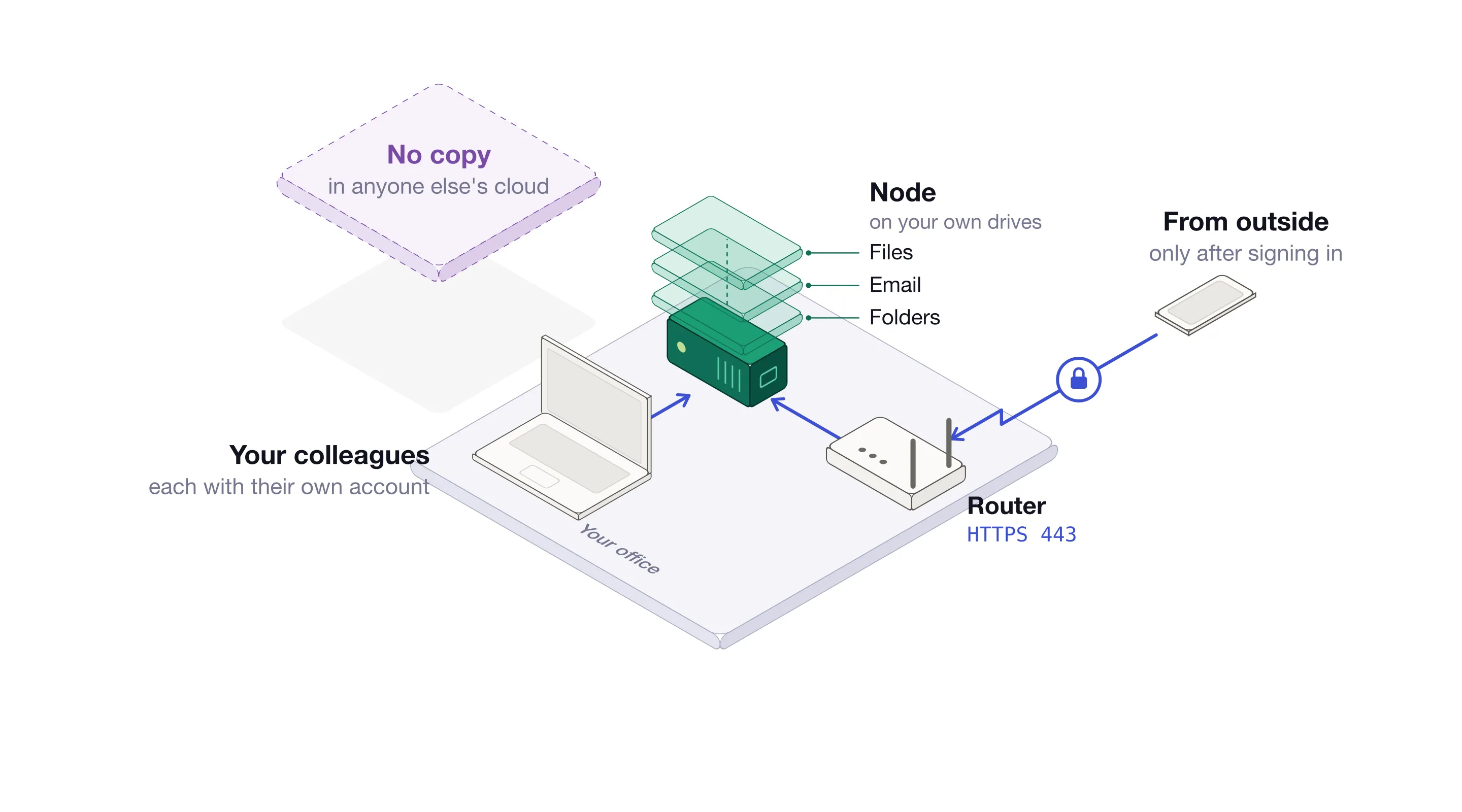
At the office
On your local network, each app asks for its own account. Folders and time machines ask for a node username and password, and each user reaches only the ones they have been given access to.
From outside
From the internet, nothing reaches the node unless you forward ports to it on your router. With port 443 forwarded, the apps open at their own names. Managing the node and some of the apps ask for a node account first, and then the app asks for its own.
After 3 failed sign-in attempts within 10 minutes, signing in from that address is blocked for 12 hours.
Folders and time machines are never put on the internet: there is no port to forward for them. Away from the office, they are reached only over the VPN.
The people in your firm
Every user of the node has a role. Users reach the folders and time machines they have access to. Administrators manage the node and its users. The owner, whose password was set during setup, is the only one who can make someone an administrator.
When someone leaves, Lock stops them from signing in and from reaching folders and time machines, and Delete removes them. Either one signs them out everywhere. The sessions list shows every browser a user is signed in from, the address it is used from and when it was last active.
Apps keep their own accounts, separate from the node’s. When someone leaves, disable them in Nextcloud and in the other apps they used too.
In the room
The node is small and sits in your office, so it gets the same care as the paper files: a room or a cabinet that locks, away from where visitors go.
Keeping it available
GDPR asks for the ability to restore the availability of personal data, and access to it, in a timely manner after a physical or technical incident (Article 32). A node does that in four layers.
- More than one drive. The pool keeps every piece of data on more than one drive, so a failed drive loses nothing.
- A monthly check. Once a month the pool reads all of its data back, checks it against its checksums and repairs anything that does not match.
- A history. By default, the node takes a snapshot for each of the last 36 hours, 30 days, 60 months and 5 years, and how long each kind is kept can be changed. Snapshots are read-only, so ransomware cannot change them, and a deleted or overwritten Nextcloud file can be found by name and restored.
- Other nodes. The data and its snapshots are replicated to another node, or to several, so a node can fail without the data going with it.
The first three live on the node itself and cover a failed drive, a deleted file and ransomware. Replication covers losing the node itself. Against a fire or a theft, the other node has to be in another building.
Deleting it for good
GDPR also gives people the right to have their data erased (Article 17), so it matters what deleting a file actually does.
Deleting a file in Nextcloud moves it to the trash, which keeps it for at least 30 days unless it is emptied. Under it, the snapshots keep what was on the pool when they were taken. A deleted file stays in the older snapshots until they expire on their schedule: within hours for the hourly ones, and after five years for the yearly ones, unless you keep them for a different time.
Nextcloud’s snapshots cannot be paused or disabled, because finding and restoring its files relies on them. Write them into your records the way you would any backup: what they hold, that they are kept only to restore after an incident, and the schedule they expire on.
What it comes down to
- One place. The data is on drives in your office, and nowhere else.
- No one in between. There is no provider holding it, no transfer to account for and nothing collected.
- You decide who gets in. Node accounts, app accounts and the ports you forward are the only ways in.
- A history with an end. Five years to restore from by default, or as long as you choose, on a schedule you can write down.
Where to go next
- Authentication covers signing in, on your network and from outside.
- Users covers roles, locking and sessions.
- Snapshots covers restore points and getting files back.
- Nextcloud on your own node, or OneDrive compares keeping files on a node with keeping them in Microsoft’s cloud.